
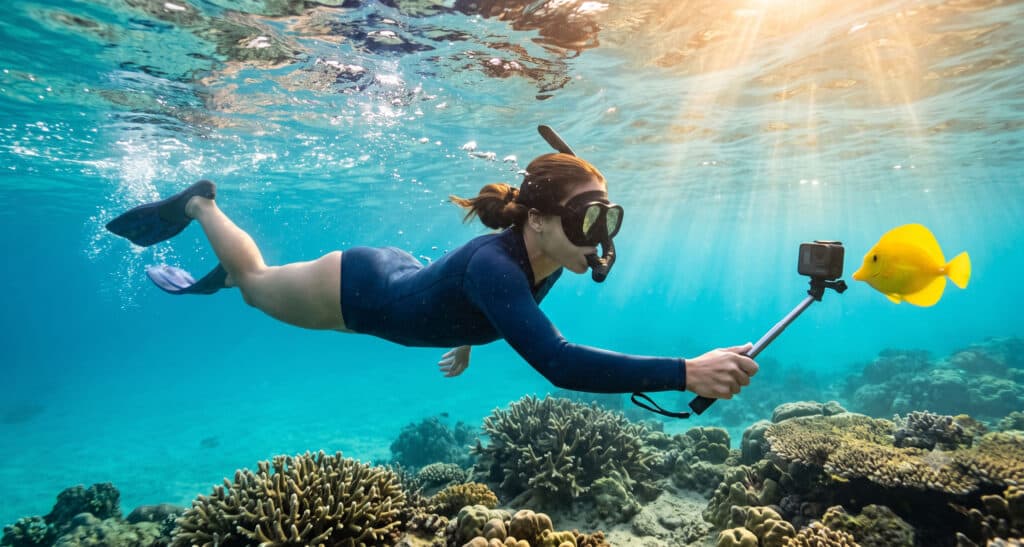
Most people wade into the ocean in Waikiki, look down through their snorkel mask, and immediately wish they had a camera. A green sea turtle drifting past. A school of yellow tangs doing their synchronized thing. A curious reef fish staring at you like you owe it money. That sting of regret is real.
The good news: underwater camera snorkeling in Waikiki is easier than it looks. The water is accessible, the fish are cooperative, and you can be in the ocean within minutes of leaving your hotel. Whether you’re shooting with a $20 disposable or a current-gen GoPro, the gap between “meh” snapshots and “wait, I actually took that?” comes down to a handful of things most people skip entirely.
This guide covers the best Waikiki snorkeling spots for underwater photography, which cameras actually perform, and the techniques that separate a lucky shot from a consistently good one.
Best Snorkeling Spots in Waikiki for Underwater Photography
Waikiki proper has two walk-in snorkeling spots worth your camera time. No boat, no reservations, and close enough to your hotel that an early-morning session is completely realistic.
Queen’s Beach (Queen’s Surf), near Kapiʻolani Park and the Waikīkī Aquarium, is the go-to underwater photography spot in the area. The water here falls within the Waikīkī Marine Life Conservation District (MLCD), where fishing and taking marine life are prohibited—which means the fish are plentiful and surprisingly unbothered by people with cameras. Entry is easy, navigation is straightforward, and you don’t need to be a strong swimmer to get good shots here.
For the best results at Queen’s Beach, enter on the south end near the Aquarium’s sea wall. Work the edges where rocky structure meets open water—fish cluster there, and the contrast gives your photos natural depth. Slow down, hold still, and let the fish come to you rather than chasing them. The shots improve dramatically once you stop moving like a threat.
Sans Souci Beach (Kaimana Beach), just south of Queen’s, is a favorite for beginners. The entry is gentler, the water shallower, and the rocky sections reward patient photographers with small reef fish, interesting textures, and occasional turtle sightings. Clarity varies—some days it’s stunning, others it’s stirred-up and green. The fix is simple: arrive early before foot traffic kicks up sand.
- Best time at both spots: Arrive by 8–9 a.m. for the clearest water and the best natural light angle
- What you’ll photograph: Reef fish in clusters, solo portrait-style shots, sea turtles (stay at least 10 feet away), and rocky reef textures
- Watch for current: Near channels and walls at Sans Souci, the swim back can feel harder than the swim out—don’t push it on a rough day
If your goal is a turtle-gliding-over-coral shot worthy of a travel magazine, consider a Turtle Canyons snorkel tour as an upgrade. It’s offshore and boat-accessed, with consistently better turtle probability than Waikiki’s shore entries. Our catamaran cruise guide covers the Waikiki boat snorkel options that reach Turtle Canyon. And if you want Oahu’s most famous snorkeling, our complete Hanauma Bay guide covers reservations, what to expect underwater, and the best times to go.
Before You Get in the Water: Safety First, Photos Second
The best underwater photo isn’t worth a sketchy swim. Waikiki is generally calm, but ocean conditions change quickly and can catch first-timers off guard.
- Check posted flags and ask a lifeguard if you’re unsure about conditions—this takes 30 seconds and can save your whole trip
- Avoid high surf, strong currents, and heavy shorebreak—these are dangerous for snorkeling and will also ruin your photos (surge = blurry)
- Reefs, groins, and seawalls are sharp—give yourself room, especially when you’re focused on a shot instead of your surroundings
- Swim with a buddy and stay within your comfort zone; a calm, steady snorkeler is also a better photographer
Apply reef-safe sunscreen (Hawaii bans certain chemical UV filters—check your label) and consider a rash guard for extended sessions. Our Waikiki packing guide covers reef-safe sunscreen options, water shoes for rocky entries, and the rest of your beach kit in detail.
Best Underwater Cameras for Snorkeling in Waikiki (2026)
You don’t need a Hollywood rig to get great shots at Waikiki’s shallow reefs. Here are the smartest options at every level, from your first time in the water to “I’m serious about this.”
Waterproof disposable camera — beginner-friendly, zero stress. The Fujifilm QuickSnap is the classic option. Film limits and lower resolution are real tradeoffs, but for first-timers or trips with young kids, the simplicity is exactly the point. Best for: people who want memories without gear anxiety.
Budget action cam (AKASO EK7000) — best value for money. Affordable, rated for meaningful depth with the included housing, and comes with a large accessory bundle. Easy to mount on a float handle, simple to operate, and genuinely capable for both video and stills. Best for: beginners who want real results without GoPro pricing.
GoPro HERO13 Black — easiest path to impressive photos. If you want crisp, vibrant footage with minimal fuss, the HERO13 Black is the benchmark. It’s waterproof to 33 ft / 10 m without a housing (deeper with a dive housing), stabilization is excellent, and the color science produces bright, punchy frames right out of the camera. Still GoPro’s current flagship action cam as of 2026. Best for: travelers who want the most impressive results with the least learning curve.
DJI Osmo Action 6 — top specs for serious shooters. Released in November 2025, the Osmo Action 6 is waterproof to 20 m without a case and 60 m with one, and its variable aperture from f/2.0 to f/4.0 handles Waikiki’s bright, shallow-water conditions exceptionally well. Image quality is excellent, and DJI’s color profile suits reef environments. Verify current US availability before purchasing. Best for: action cam enthusiasts who want the highest specs available.
OM SYSTEM Tough TG-7 — compact camera feel, built for water. Waterproof to 15 m and built for rugged conditions, the TG-7 looks and handles like a “real” camera rather than an action cam. It offers manual controls, a macro mode (perfect for small reef creatures up close), and a proper grip. Best for: photographers who want more control than an action cam provides.
If you’d rather rent gear in Waikiki than pack your own, our guide to the best dive centers in Waikiki lists shops within walking distance of most hotels that rent snorkel equipment and camera accessories.
Setting Up Your Camera Before You Swim (The 2-Minute Checklist)
The ocean is not the place to learn your camera’s menu system. Most ruined snorkeling shoots trace back to skipping this step on shore. Run through it every time, even if you’ve done it a dozen times before.
- Battery charged, memory card cleared — obvious, but easily forgotten in vacation mode
- Housing sealed and gasket checked — run a finger around the seal and look for sand, hair, or debris; a compromised seal in saltwater is an expensive lesson
- Lanyard attached — ocean butterfingers are real; a float strap saves cameras every single day
- Settings confirmed on dry land — white balance, resolution, video vs. photo mode; set it before you get in
- Fog test — if your lens or mask fogs up in a quick test dip, anti-fog drops fix it in seconds
How to Shoot Better Underwater Photos in Waikiki
Gear accounts for maybe 30% of a great underwater shot. Technique does the rest. These are the moves that separate a tourist snap from a photo you’ll actually want to print.
Work with the Light
Underwater photography is fundamentally a game of light. In Waikiki’s shallow reef environment, you have a natural advantage—you’re close to the surface, which means more light reaches you than it would on a dive.
The best shooting window runs from roughly 9 a.m. to 1 p.m., when overhead light penetrates the water most directly. Morning and late afternoon produce softer, prettier tones above water—but you lose brightness fast once you’re submerged. Keep the sun roughly behind you when shooting your subject: it gets lit from the front, your camera sees the full color spectrum, and the result looks vibrant rather than washed out. On overcast days, images skew blue-green—a warmth adjustment in editing corrects it in about 30 seconds.
Positioning and Technique
Get closer. Then get closer than that. The single most important rule underwater. Every foot of water between your lens and your subject adds haze, kills color, and reduces contrast. Most beginners shoot from two or three times the ideal distance. If you remember one thing from this guide, make it this.
Shoot from the side or front, never straight down. Hovering upright above a fish gives you a forgettable top-down shot and stirs up sand. Get horizontal, get on the fish’s level, and shoot from the front or at a slight angle. This one adjustment changes the character of your photos dramatically.
Predict, don’t chase. Following a moving fish produces blurry shots and stressed-out fish. Instead: watch the direction it’s swimming, move ahead of it, hold completely still, and let it enter your frame. You’ll get sharper images and a more relaxed subject.
Use background strategically. A cluttered reef can swallow your subject. Shoot slightly upward to put open blue water behind the fish. Look for clean sand patches or open water as negative space. Separation makes your subject pop against the frame.
Shooting with Your iPhone Underwater
Modern iPhones carry strong water resistance ratings—but water resistance is not the same as “safe to snorkel with freely,” and that rating degrades with normal wear over time. A quality underwater housing or waterproof case is strongly recommended, even if your model is technically rated for water exposure.
- Use the 1x lens — the ultra-wide lens can look soft and distorted underwater; stick to the main lens for the cleanest results
- Tap and hold to lock focus and exposure — prevents the camera from constantly readjusting as fish move through frame
- Shoot video and grab stills — burst mode and continuous capture often catch the perfect moment better than timing a single shot
- Always use a float strap — a dropped phone in ocean water is gone; a float strap is a $10 insurance policy
A Simple Editing Pass That Makes Underwater Photos Pop
Even a solid underwater shot usually needs a few minutes of polish. The ocean strips warmth and contrast from images—editing restores what your eye saw but the camera couldn’t fully capture.
A five-step pass works on most underwater shots:
- Warm it up slightly — a touch of warmth counters the blue-green cast that water introduces
- Add contrast — restores depth that flat underwater light tends to flatten out
- Nudge vibrance, not saturation — vibrance makes colors look alive without turning reef fish neon
- Reduce haze — useful if the water looks milky or backscattered
- Crop tighter if needed — if you didn’t get close enough underwater, cropping fixes it in post
Lightroom Mobile is free, excellent, and handles all of this in about five minutes per image. Both GoPro and DJI have companion apps with built-in underwater color presets if you prefer to edit within the camera’s ecosystem.
Frequently Asked Questions About Underwater Camera Snorkeling in Waikiki
Is snorkeling in Waikiki good for beginners?
Yes—especially at Queen’s Beach and Sans Souci/Kaimana Beach, which both have easy walk-in entries and shallow water. Always check posted flags and ocean conditions before getting in, and stay close to shore if you’re not a confident swimmer. Waikiki’s Marine Life Conservation District status means fish activity is generally solid even for beginners.
What is the best underwater camera for snorkeling in Waikiki?
For most travelers, the GoPro HERO13 Black is the best balance of image quality, ease of use, and travel convenience. It’s waterproof to 33 ft without a housing, fits in any bag, and the footage looks great right out of the camera. If budget is the priority, the AKASO EK7000 delivers solid results at a fraction of the price.
What are the best snorkeling spots in Waikiki?
Queen’s Beach (Queen’s Surf) near the Waikīkī Aquarium and Sans Souci Beach (Kaimana Beach) are the two most accessible spots for snorkeling directly from Waikiki. For a more spectacular experience with higher turtle probability, a Turtle Canyons boat snorkel tour is worth adding to your trip.
Can I snorkel in Waikiki without a tour?
Absolutely. Queen’s Beach and Sans Souci are both walk-in spots with no reservations or tour required. Grab a mask and fins from a nearby rental shop, check the conditions, and you’re in. A tour only becomes worthwhile if you want offshore spots like Turtle Canyons or a more structured experience with a guide.
What is the most common mistake people make with underwater photos?
Shooting from too far away. Water absorbs color and contrast quickly, so distance ruins photos faster than anything else. The second most common mistake is shooting straight down at the subject instead of getting horizontal and shooting at eye level. Both are fixable once you know to watch for them.
Do I need reef-safe sunscreen for snorkeling in Waikiki?
Yes—and it’s not just an ethical choice. Hawaii bans the sale of sunscreens containing oxybenzone and octinoxate due to their documented harm to coral reefs. Bring reef-safe sunscreen from home, or use a rash guard as your primary UV protection while snorkeling.
Snorkeling in Waikiki with an underwater camera is one of the most rewarding—and forgiving—forms of travel photography out there. The fish are curious, the reef is accessible, and you don’t need to spend a fortune on gear to come home with shots that make people stop scrolling. Pick your spot, run your checklist on shore, get closer than feels natural, and let the ocean do the rest.
To explore beyond Waikiki’s shoreline, our North Shore Oahu snorkeling guide covers Shark’s Cove and other summer spots well worth the drive. And for planning your full Oahu itinerary—including day excursions that pair perfectly with a morning snorkel—our 20 best day trips from Waikiki is a smart next read.